
GLP-1 dose tracker
Know when your next dose is due.
Log each GLP-1 dose in one tap, get reminded when the next is due, and see weight, doses and side effects on one timeline.
Log a dose in one tap, get reminded, and see your whole log on one timeline.

Scan with your phone's camera
Opens the App Store or Google Play
Free to downloadNo account neededNo ads


How it works
From one tap to one timeline
Four things titra does with what you log.
-
Step 1 of 4 · Log
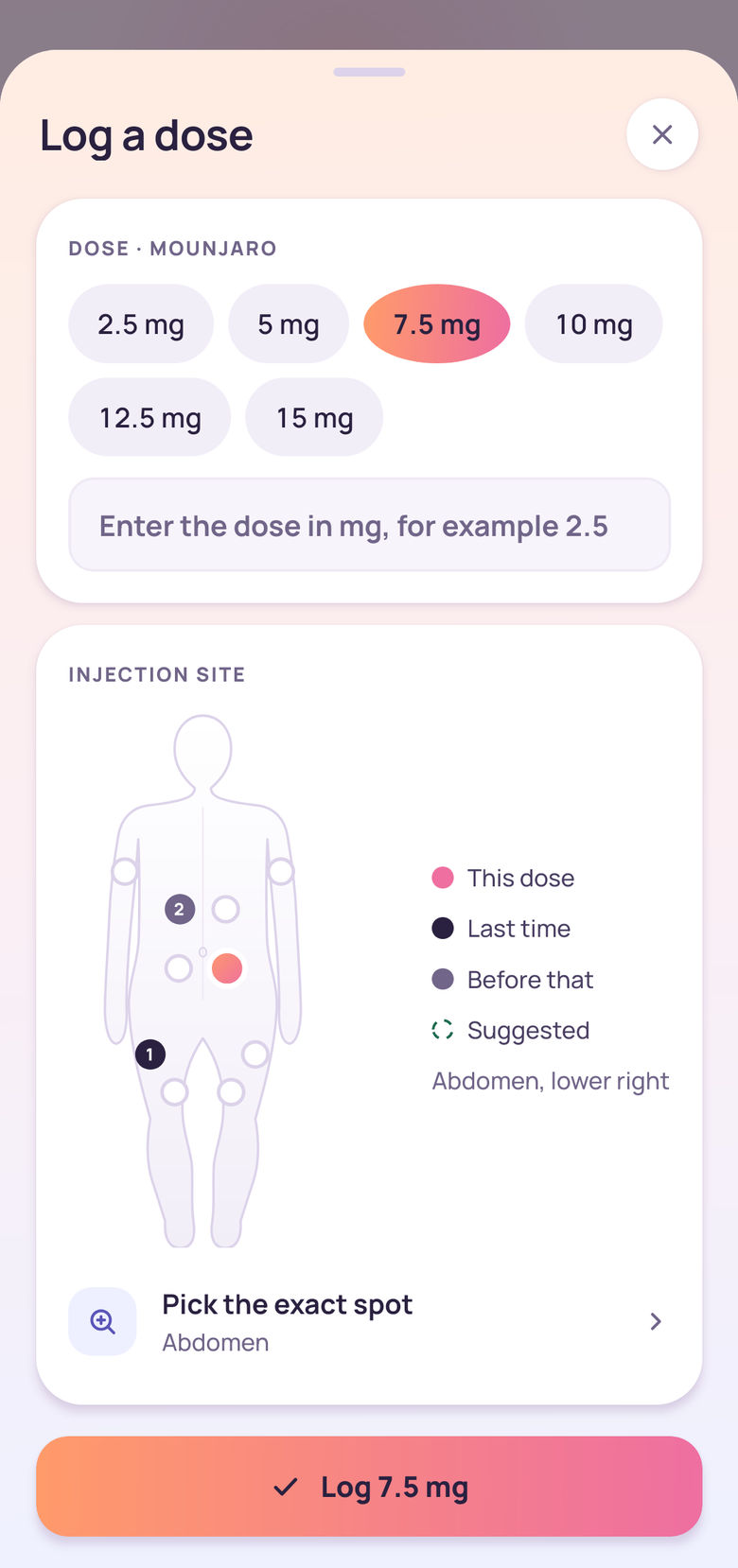
Log a dose in one tap.
The sheet opens with your current dose and a suggested site already filled in, so most days you just tap Log. Logged it late? Pick the real date and time. Any entry can be edited or deleted afterwards.
-
Step 2 of 4 · Remind
Reminders that keep going.
You pick the time. Each reminder is timed from the dose you last logged, so the schedule follows what you really did, and reminders keep coming after a missed dose. Tap one to open the dose log.
titra
Medication reminder
Your scheduled dose is due. Tap to log it.
The medication name stays hidden unless you switch that off in the You tab. -
Step 3 of 4 · Map
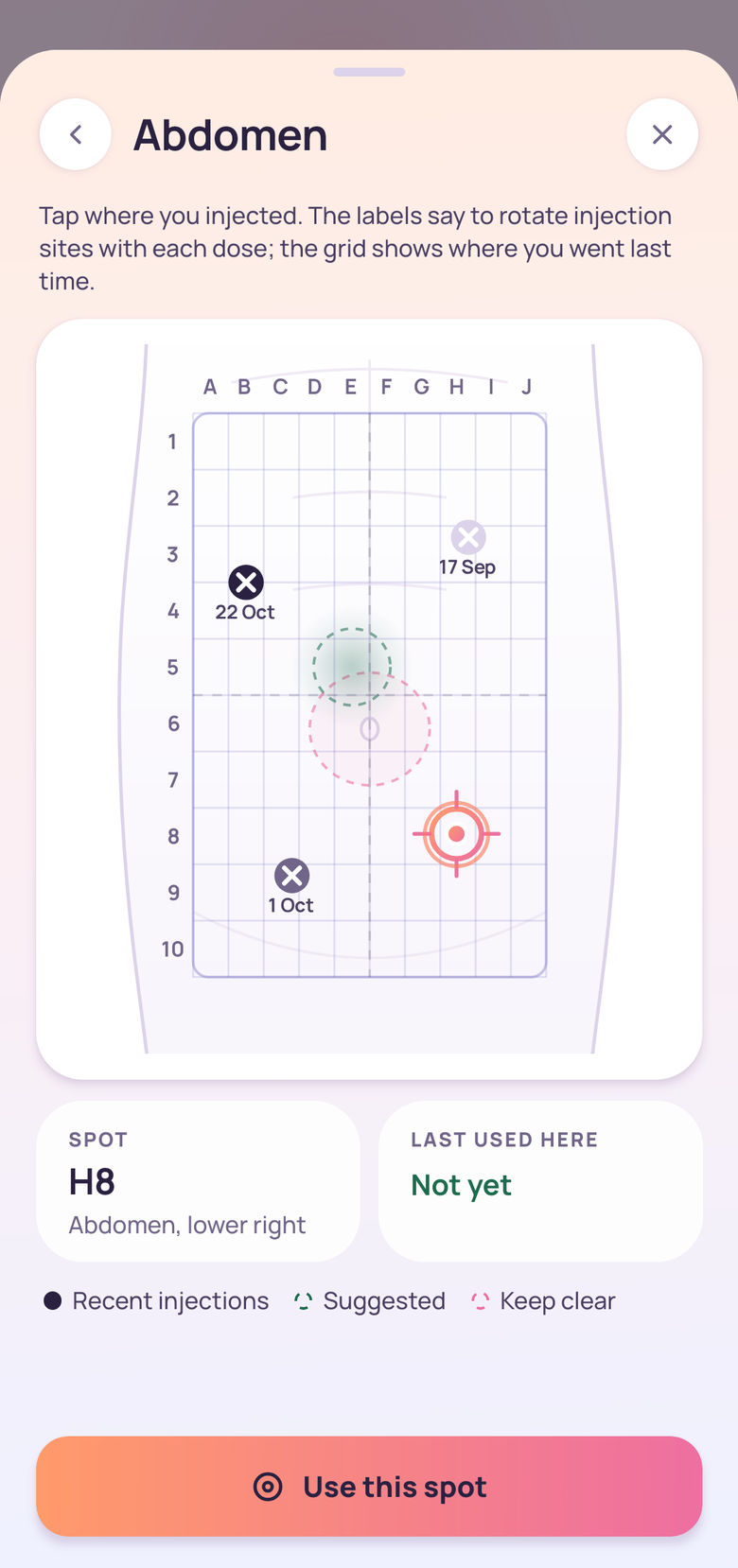
See where you injected last.
A body map of the stomach, thighs and upper arms numbers your last two sites and puts a dashed ring on a suggested next one. Zoom into an area to record the exact spot on a grid.
-
Step 4 of 4 · History
Every dose, in one list.
History lists every dose you logged, month by month, with its date, time and injection site. Weights and side effects have their own lists, and any entry can be edited or deleted.
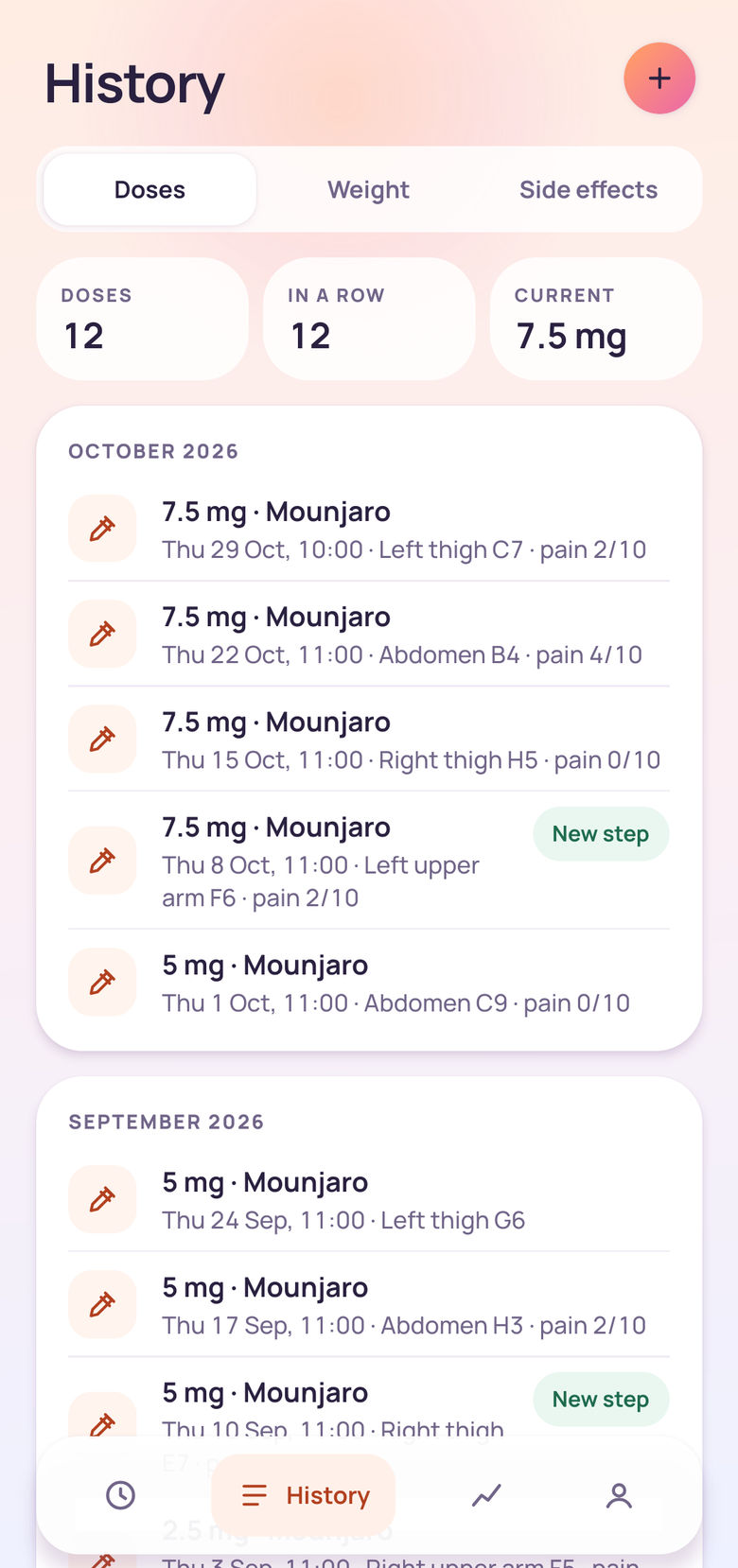


Screens from titra on Android, showing sample data.
titra never
- titra never gives dosing or medical advice.
- titra never shows ads or sells your data.
- titra never needs an account to keep your log.
One timeline
Three records, one chart
Weight, dose steps and side effects usually live in three different places. titra draws them on the same dates.
The chart is a record, drawn from your own entries. It does not judge the numbers or say what they should be.
Reading across it answers the questions people take to an appointment: what the dose was at the time, and what was logged in the weeks after a change. After a dose change, Today also reminds you what you logged after your last step-up.
There is an optional switch that adds the published trial average for your medication, with its source. It is off until you turn it on.
Sample data
| Week | Weight | Dose logged | Side effects logged |
|---|---|---|---|
| 1 | 92.4 kg | 2.5 mg | Nausea, Mild |
| 2 | 92.1 kg | 2.5 mg | |
| 3 | 91.6 kg | 2.5 mg | |
| 4 | 91.9 kg | 2.5 mg | |
| 5 | 91.2 kg | 5 mg | Nausea, Moderate |
| 6 | 90.7 kg | 5 mg | Tiredness, Mild |
| 7 | 90.9 kg | 5 mg | |
| 8 | 90.3 kg | 5 mg | |
| 9 | 89.8 kg | 7.5 mg | Heartburn, Mild |
| 10 | 90 kg | 7.5 mg | |
| 11 | 89.4 kg | 7.5 mg | |
| 12 | 89.1 kg | 7.5 mg |
Weight
Each weigh-in you log is a point on the line, in kilograms or pounds.
Dose steps
A shaded band runs for as long as you logged the same dose, and a new band starts on the day the dose changed.
Side effects
Each side effect you log sits on its date along the bottom of the chart.
What's in the app
Logging is free. titra+ adds more.
Everything you need to keep the log is free. The cards marked titra+ are part of an optional subscription.
-
Dose ring and countdown
Today shows a ring that fills across your dose interval and says how many days are left, or how many days late a dose is.
-
Reminders
One reminder time, timed from the dose you last logged. For daily tablets it comes every day, for weekly injections every seven days.
-
Discreet by default
Reminders read "Medication reminder" and leave the name of your medication off the lock screen unless you choose to show it.
-
Injection-site map
Ten sites across the stomach, thighs and upper arms, your last two marked, plus a zoomed grid for the exact spot.
-
Side effects, in context
Log what you felt, how strong it was and how long it lasted. titra shows how often it was reported in the prescribing information, next to placebo.
-
Export and delete
Export the whole log as a CSV file whenever you like, or delete every entry on the phone from the You tab.
-
24 languages
The app follows your phone's language or the one you pick, and takes weights in kilograms or pounds.
-
Light and dark
titra follows your phone's light or dark setting.
-
Insights
Views built from your own log: which days after a dose your side effects land, a review of every dose step, and how food noise moves across your dose week.
titra+
-
Weight from your scale
Reads weight, and only weight, from Apple Health or Health Connect, so weigh-ins from a connected scale appear when you open titra.
titra+
-
PDF summary
A PDF of your dose steps, weight and side effects to share with your prescriber. It states what you logged and nothing else.
titra+
-
Cloud backup and sync
Sign in to back up your log and bring it to a new phone. This is the one feature that uploads your log.
titra+
titra+ is optional and billed by the App Store or Google Play, which show the price before you pay.
Help
How titra behaves
Short articles on what the app does with your log, each checked against the app itself and dated.
-
titra+
What is free in titra and what titra+ adds
The full list of what titra does for free, what the optional titra+ subscription adds, how it is billed and what happens if you stop.
-
Using titra
How titra dose reminders work
How the due date is worked out, what happens after a missed dose, how far ahead reminders are planned and what they show on the lock screen.
-
Using titra
How the injection-site map works in titra
The ten sites, what each mark on the map means, how the suggested site is worked out, the zoomed grid and the keep-clear ring.
-
Your data
Your titra data: where it lives, export, delete
What is stored on the phone, what leaves it and when, what cloud backup does, how CSV export works, and what each of the two delete buttons removes.
Does titra give medical advice?
No. titra records what you log and never gives dosing or medical advice. It is a personal logging tool, not a medical device. Questions about your medication go to your prescriber.
Do I need an account?
No. titra works fully without an account, and logging, reminders, the site map and CSV export never ask for one. You only sign in if you choose cloud backup, which is part of titra+.
Which medicines does it work with?
Weekly GLP-1 injections and daily GLP-1 tablets. You pick your medication when you set the app up, and titra takes the dose steps and the interval from that medicine's label. The names are listed on the questions page.
What leaves my phone?
Your log is stored on your phone and stays there unless you turn on titra+ cloud backup, which uploads it to Google Firestore. Crash reports are always sent and contain no health entries. Usage analytics are off unless you switch them on. More in your data, export and delete.
What does titra+ add?
Insights drawn from your own log, weight import from Apple Health or Health Connect, a PDF summary for your prescriber, and cloud backup and sync. Logging stays free. titra+ is optional and billed by the App Store or Google Play, which show the price before you pay.
What do reminders show on my lock screen?
By default a reminder reads "Medication reminder. Your scheduled dose is due. Tap to log it." The name of your medication appears only if you turn off the setting that hides it.
Can I get my data out, or delete it?
Yes. Export CSV in the You tab shares the whole log as a file, free. Delete all data removes every entry from the phone. If you used cloud backup, deleting your account removes the cloud copy.
Which phones and languages?
iPhone and Android phones, in 24 languages, with light and dark themes.
Who makes titra
A note from the team
We make titra at AgentM, an independent studio. It has one job: keeping a clear record of a GLP-1 routine, so that when the next dose is due and where the last one went are both on one screen.
One rule decides what goes in. titra records what you log and never recommends: it has nothing to say about how much to take or when to change dose, and it passes no verdict on your numbers. Where the app shows a figure from a medicine's label or a published trial, it says where the figure comes from. The decisions stay with you and your prescriber.
This site follows the same rule. The help articles describe how the app behaves and are checked against its code before they go up. If something here is wrong, write to info@titrapp.com and we will fix it and log the change.
The titra team at AgentM